

The dashboard is the first thing an account holder sees every time they log in. It’s the most valuable screen in digital banking, and for most financial institutions, it’s also the hardest one to change. Narmi Tiles opens it up. Any custom Narmi Functions (NAF) app can now appear as an interactive card on the dashboard, on web and mobile, looking and feeling like it was always part of the experience.
Until now, NAF apps have lived in the Tools & Services menu and the Services card on the dashboard, giving account holders a quick link to launch them. That works well for getting people into an app, but the experience itself still happened on a separate screen.
Meanwhile, expectations kept rising. Embedded, contextual experiences have become a common ask in digital banking, and institutions evaluating platforms increasingly want to know how much of the dashboard they can make their own.
Narmi Tiles gives any NAF app a “Tile” view that renders inline on the banking dashboard. Tiles are great for quick actions like tapping a button, flipping a toggle, or sliding to adjust a savings goal. If an account holder needs to do something more involved, they can open the Full view from the tile and pick up right where they left off.
A few things make tiles feel native rather than bolted on:
Whether a tile is powered by Narmi or by a partner integration behind the scenes, account holders see one consistent, branded experience.
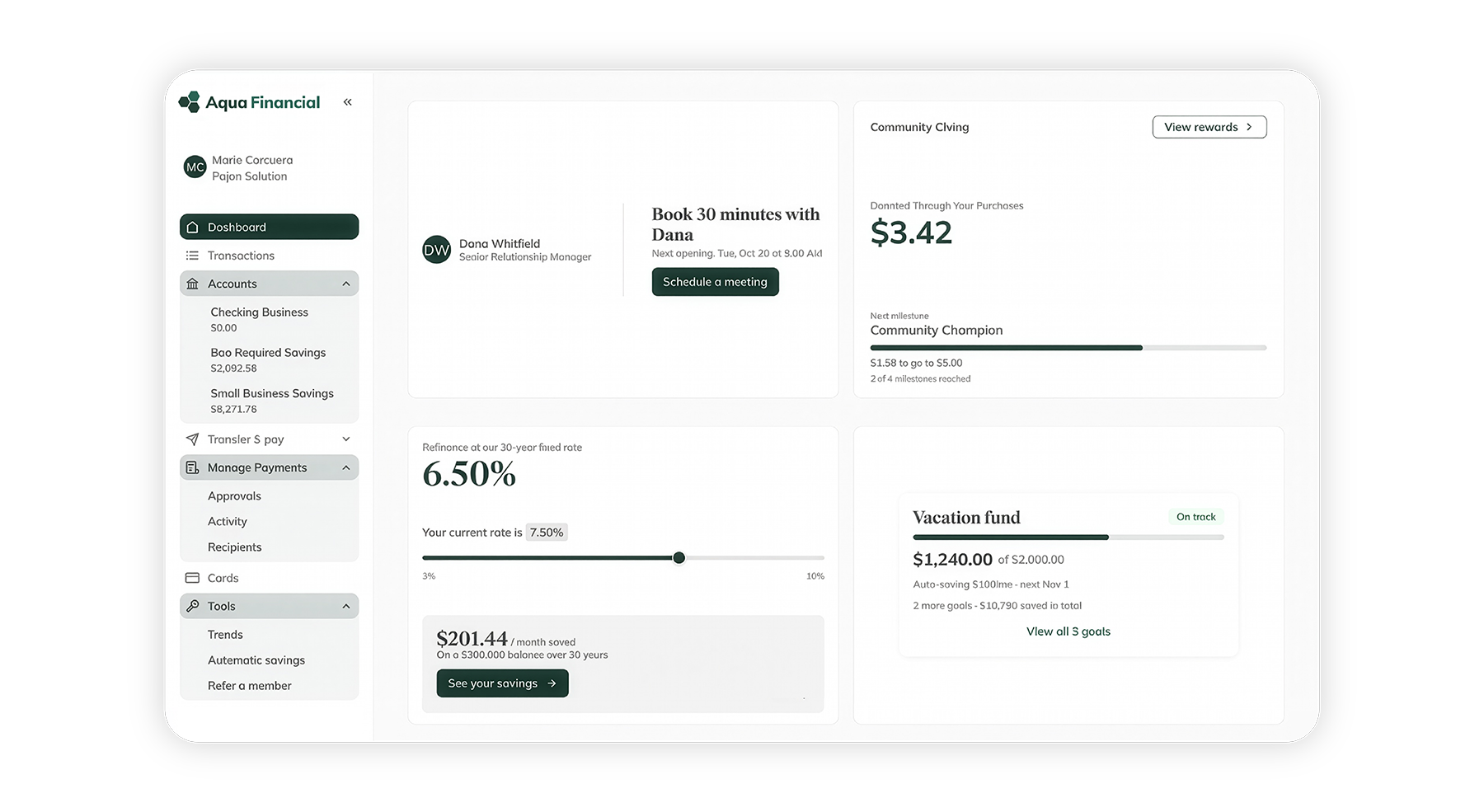
Bespoke functionality used to mean waiting on a full product build. Now, Narmi’s toolkit pairs a set of developer packages with Tile Studio, a local preview tool that shows exactly how a tile will render inside the real banking app before it ships. Add AI-assisted coding to the mix, and a developer can generate working tile code in minutes and build and validate a complete tile in about a day.
Speed doesn’t come at the expense of consistency. The platform enforces its own design guardrails, including set tile sizes, aspect ratio limits, and no internal scrollbars, so a tile can’t break the dashboard or clash with the rest of the experience.
Not every institution has developers ready to build their own tiles, and they don’t need to. Narmi’s Forward Deployed Engineering (FDE) team can build a tile end to end on your behalf.
Narmi’s FDE team works with the same toolkit and Tile Studio preview available to any developer, and every tile is checked against the platform’s design guardrails before it goes live. You bring the idea, whether that’s a savings challenge for your members or a tool built for a specific business segment, and FDE turns it into a working tile on your dashboard.
“With the forward deployed engineering team, it’s this open field of opportunity. Once you see what Narmi’s engineers can put on the dashboard, the ideas don’t stop coming.”
-Shane Saunders, President and CEO at Mocse Credit union
Once it’s built, there’s nothing new for your team to learn. Admins enable a tile through the existing NAF app setup by selecting a Tile view, and can switch it off just as easily. Account holders just see a new card on their dashboard.
Financial Institutions and their partners will also be able to build and configure tiles themselves with the developer toolkit. Either way, the end result looks and feels the same.
If it can be built as a NAF app, it can become a tile. A few examples:
For business banking, it gets even more interesting. An institution serving landlords, gig workers, or healthcare practices can put tools built for that niche front and center, something a generic third-party widget was never going to do.
Narmi has always been built as an open platform. Tiles extend that openness to the most visible surface in digital banking. For community financial institutions, that means a dashboard that reflects who they are and who they serve, experiences that feel as polished as anything from a megabank or fintech, and the agility to keep adding new ones without waiting on a roadmap.
Narmi Tiles is now available for all Narmi banking customers. To explore what a tile could look like on your dashboard, reach out to your Narmi contact to get started.